
Getting your settings right in a fast-paced game like Arc Raiders will impact both your game’s performance and competitive pursuit. While the game is generally well-optimized, fine-tuning a few key options can give you a massive boost in FPS, reduce input lag, and allow you to spot enemies clearly without visual clutter. In fact, this is true while playing on both PC and console. Our guide will help you achieve the smoothest, most responsive, and most visually effective gameplay experience possible, focusing on a balance of crisp visuals with high frame rates, while prioritizing low input latency which is a must-have for any competitive shooter.
Best Arc Raiders PC Settings for Max FPS and Low Latency
The main goal for Arc Raiders graphics settings on PC is to achieve the highest stable frame rate possible and minimize input lag through software features like NVIDIA Reflex and V-Sync disablement. This combination will then allow your actions to be registered instantly, giving you an edge in the game.
| Settings Category | Setting | Value |
|---|---|---|
| Display Mode | Window Mode | Fullscreen |
| Resolution | Display Resolution | Native Resolution |
| Frame Rate | V-Sync | Disabled |
| Frame Rate | NVIDIA Reflex Low Latency | On + Boost |
| Upscaling | Resolution Scaling Method | NVIDIA DLSS or AMD FSR3 |
| Visual Effects | Motion Blur / Depth of Field | Disabled |
| Graphics | Shadows Quality | Low |
| Graphics | Post-Processing | Low |
| Graphics | Foliage Quality | Low |
| Graphics | Texture Quality | High |
| Camera | Field of View (FOV) | Max (80) |
| Controls | Mouse Smoothing | Disabled |
For PC players, the biggest performance gains come from dramatically reducing the load of complex lighting and geometry by setting Shadows, Post-Processing, and Foliage Quality to Low. Additionally, you can get the lowest possible input delay by disabling V-Sync and enabling NVIDIA Reflex (or an equivalent AMD anti-lag feature). Finally, if you use a modern upscaling solution like DLSS or FSR on the Quality or Balanced preset, you’ll have a powerful tool to achieve a high frame rate with minimal loss in image quality.
Best Arc Raiders Console Graphics and Controller Settings (PS5 and Xbox Series X|S)
On consoles, your graphics options are more streamlined, but controller and audio settings can be tinkered with a bit further. The focus is on maximizing the FOV and tuning controller responsiveness for optimal aiming.
| Settings Category | Setting | Value |
|---|---|---|
| Graphics | Field of View (FOV) | Max (80) |
| Graphics | Motion Blur | Disabled |
| Controller | Look Sensitivity (H/V) | 75% / 70% (Start) |
| Controller | Aim Down Sights (ADS) Multiplier | 35–45% |
| Controller | Deadzone (Inner) | 5–10% |
| Controller | Aim Assist | On / Default |
| Audio | Night Mode Audio | On |

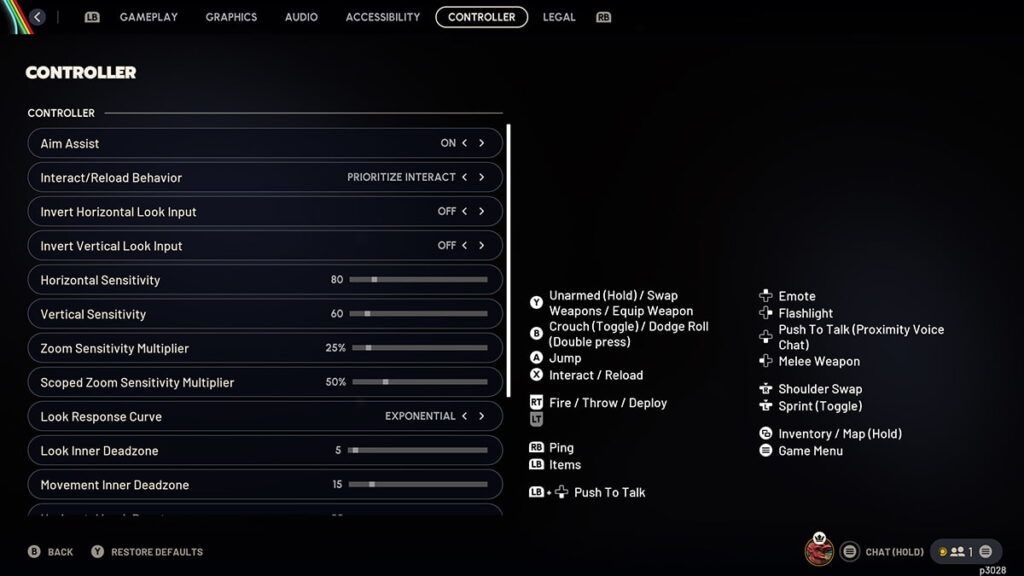
For Console players, the aim is more focused on control and clarity, as there aren’t many graphical options to play with. You should seek to run the game in Performance Mode (if available) for 60+ FPS, and set your Field of View (FOV) to the maximum for better awareness. The responsiveness of your stick input is managed by finding the sweet spot for your Deadzone and Sensitivity settings. Finally, the Night Mode Audio setting is an equalizer across all platforms, so that you can hear subtle enemy movements. Additionally, Patch 1.13.0 added a new tab for free rebinding of most gamepad buttons. This is a massive new addition for console users (or even PC players who use a gamepad), as the ability to rebind buttons is a top-tier feature for competitive Raiders.
Optimization for Competitive Play
On both PC and Console, the optimal setup for Arc Raiders is governed by two principles – Low Input Lag and Maximum Clarity.
- Low Input Lag: On PC, this is managed by disabling V-Sync and using NVIDIA Reflex. On console, it’s achieved through a low-latency Performance Mode and the lowest feasible controller Deadzone.
- Maximum Clarity: The best settings universally are disabling Motion Blur and Depth of Field. For clearer sightlines in competitive gameplay, PC players should set Foliage Quality and Shadows to Low.
- Audio Settings: The Night Mode Audio setting on all platforms is a must-use, as it increases the volume of important environmental sounds, giving you a tangible tactical advantage through awareness.
By applying these settings for Arc Raiders, you can expect a much smoother, higher-FPS experience with lower input latency, which translates directly into better performance in the game. Remember that the absolute perfect configuration can depend slightly on your specific PC hardware or personal control preference, so use our tables as a strong starting point and adjust your sensitivities and deadzones until they feel perfect for your playstyle. Now, get out there and start raiding! In addition, check out our Arc Raiders Best Weapons tier list and our Best Skills guide.