Fortnite is fully cross-platform. Players on PC, PlayStation 5, PlayStation 4, Xbox Series X|S, Xbox One, Nintendo Switch 2, Nintendo Switch, iPhone, iPad, and Android can all party up and play in the same matches, and cloud gaming players can join them too. Fortnite crossplay is switched on by default, so there’s nothing to enable on most devices.
Everything runs through your Epic Games account. Link it to every platform you use, and your skins, Battle Pass progress and Epic friends list follow you from device to device. The two big catches are that V-Bucks bought on Nintendo consoles stay on Nintendo, and only PlayStation and Xbox players can turn Fortnite crossplay off.
Which platforms have Fortnite crossplay?
Fortnite has one shared player base across every platform it runs on. A PS5 player can squad up with a friend on Xbox Series X, a player on Nintendo Switch and a teammate on an Android phone in the same Battle Royale match, as long as everyone signs in with an Epic Games account.
When Fortnite came out in 2017, it had no crossplay capabilities. Fortunately, Epic connected different platforms just a year later, and here is the current situation with them:
| Platform | Crossplay with other platforms | Can you turn it off? |
|---|---|---|
| PC (Windows) | Yes | No |
| Mac (Native) | No | N/A |
| PlayStation 5 and PlayStation 4 | Yes | Yes |
| Xbox Series X|S and Xbox One | Yes | Yes |
| Nintendo Switch 2 and Nintendo Switch | Yes | No |
| iPhone and iPad | Yes | No |
| Android phones and tablets | Yes | No |
Mac is the one gap. Fortnite’s Mac version hasn’t been updated since Apple removed Epic’s developer account in 2020, but Mac players can still stream the game through Xbox Cloud Gaming, GeForce NOW or Amazon Luna. Cloud players sign in with the same Epic account and play with everyone else.
Mobile availability also changed in 2026. Fortnite returned to Google Play worldwide on March 19, 2026, and to the App Store in every country except Australia on May 19, 2026, although Australian players can still stream it. The Epic Games Store also offers it on Android and on iPhone in the EU, Japan and Brazil.
Crossplay, cross-progression and account linking: what each term means
These five terms get mixed up all the time, and knowing the difference makes it much easier to work out what’s wrong when a friend can’t join you or your Locker looks empty on a new console.
- Crossplay: Players on different platforms share parties and matches. If you’re on PS5 and your friend is on Xbox Series X, crossplay is what lets you drop into the same squad.
- Cross-platform: The game is available on more than one platform. Fortnite is both cross-platform and crossplay-enabled, but plenty of multi-platform games keep their players apart.
- Cross-generation play: Older and newer consoles from the same family play together. A PS4 player can join a friend on PS5, and a Switch player can team up with someone on Switch 2.
- Cross-progression: Your unlocks and progress follow you between devices. An Outfit bought on Xbox is already in your Locker when you sign in on PC.
- Account linking: Connecting your PlayStation, Xbox or Nintendo account to one Epic Games account. Linking is what makes cross-progression work, so a console linked to the wrong Epic account shows the wrong Locker. Furthermore, it is necessary to perform account linking to unlock rewards such as Twitch Drops and free Fortnite skins.
Do you need an Epic Games account for Fortnite crossplay?
You must have an Epic Games account to enable Fortnite crossplay. This account holds your cosmetics, progress, and friends list. It’s also the account other players add as a friend. PC and mobile players sign in with an Epic account directly. On consoles, Fortnite connects your PlayStation, Xbox, or Nintendo account to an Epic account, and if you skip that step, Epic creates a new one.
That automatic account is where a lot of cross-progression problems start. If you played on a new console before linking it to your main Epic account, that console’s progress may sit on a separate Epic account, and Epic can’t merge the two. Because of this, you should link every console to your main account before you play on it.
Having all of your cosmetics in one place is much easier, especially when you’re trying to estimate the value of your Fortnite account.
How to link your console account to Epic Games
To link your console and Epic Games accounts, please follow these steps:
- Sign in at epicgames.com with the Epic Games account you want to keep.
- Open your account settings and go to the Linked accounts page.
- Choose PlayStation, Xbox or Nintendo and follow the prompts to sign in with that console account.
- Launch Fortnite on the console and check that your Locker and level match your main account.
You can also link from the console itself, as Fortnite asks you to sign in the first time you launch it. Each Epic Games account links one PlayStation, one Xbox, and one Nintendo account. If you link the wrong account, you can unlink it. However, your progress stays on the original Epic Games account, and your console account will lose access to it the moment you break the link.
It is no longer possible to merge Fortnite accounts, and this is not something Epic Games support can help with. If you have two accounts and both have items you care about, compare the two Lockers before deciding which Epic account your console should use.
How to add friends on Fortnite
Fortnite has its own friends list tied to your Epic Games account. PlayStation and Xbox friends can show up in Fortnite too, but only Epic friends work across every platform, so you need to add friends on Fortnite through Epic to party up with someone on a different console, PC, or phone.
- Open Fortnite and wait for the lobby to load.
- Select your profile icon, the circle with your initials, in the top-right corner to open the sidebar.
- Select the Add Friends icon.
- Enter your friend’s Epic display name exactly as it appears on their account.
- Select Add Friend, and a notification confirms the request was sent.
- Once your friend accepts, they appear in your friends list whether they’re online or offline.
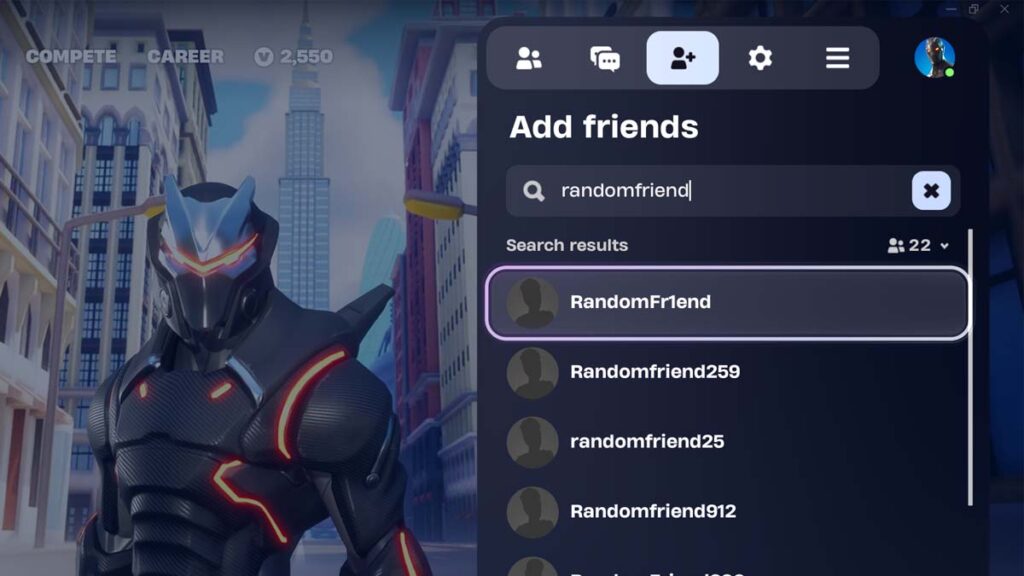
The menu is the same on PC, consoles, and mobile, so these steps work on every platform. The other player gets a pop-up notification when your request arrives and can accept it straight from that notification.
PC and mobile players can add their Fortnite friends without launching the game. On PC, adding friends can be done through the Epic Games Launcher, while mobile users can use the Social tab of the Epic Games mobile app to go through this process.
Epic display names vs console names
The name you see in a Fortnite lobby isn’t always the name to search for. Epic says changing your Epic display name doesn’t change your PSN Online ID or Xbox Gamertag, so a console friend can appear under one name in Fortnite and use a completely different Epic display name.
Ask console friends for their exact Epic display name, which they can find on their account page at epicgames.com. Epic display names can be changed once every two weeks. Console users may also change their PSN Online ID or Xbox Gamertag, although in a similar fashion, this won’t affect their Epic Games names.
Why can’t you find or add a friend on Fortnite?
If you cannot find a friend on Fortnite, there is a chance that you did not correctly type in their username, which you should use for crossplay. These are some of the most common reasons:
- Wrong name: You searched a console name instead of the Epic display name, or one character is off.
- No Epic display name yet: Players who have only ever played on console may need to sign in at epicgames.com with their console account and finish setting it up before they have an Epic display name.
- Cabined Account: Players under 13 get an auto-generated display name until a parent completes the account setup, so searching their usual name won’t find them.
- Parental Controls PIN: Parents can require their PIN before a child sends or accepts Epic friend requests, so the request won’t go through until a parent approves it.
- Blocked player: A block on either side stops the request, so both of you should check your blocked lists.
- Full friends list: Epic accounts max out at 1,000 friends, so one of you may need to remove someone first.
- Crossplay is off: The request still works, but a PlayStation player with Allow Cross Platform Play set to No, or an Xbox player with cross-network play blocked, can’t play with friends on other platforms.
How to turn crossplay on or off in Fortnite
Fortnite crossplay is on by default, and only PlayStation and Xbox players can switch crossplay off. The steps are different on each console. PlayStation players use a setting inside Fortnite, while Xbox players change it through the privacy settings on their Xbox profile.
How to turn off Fortnite crossplay on PlayStation 5 and PlayStation 4
- In the Fortnite lobby, press the Options button to open the menu, then select the gear icon to open Settings.
- Go to the Account and Privacy tab, marked with a person icon.
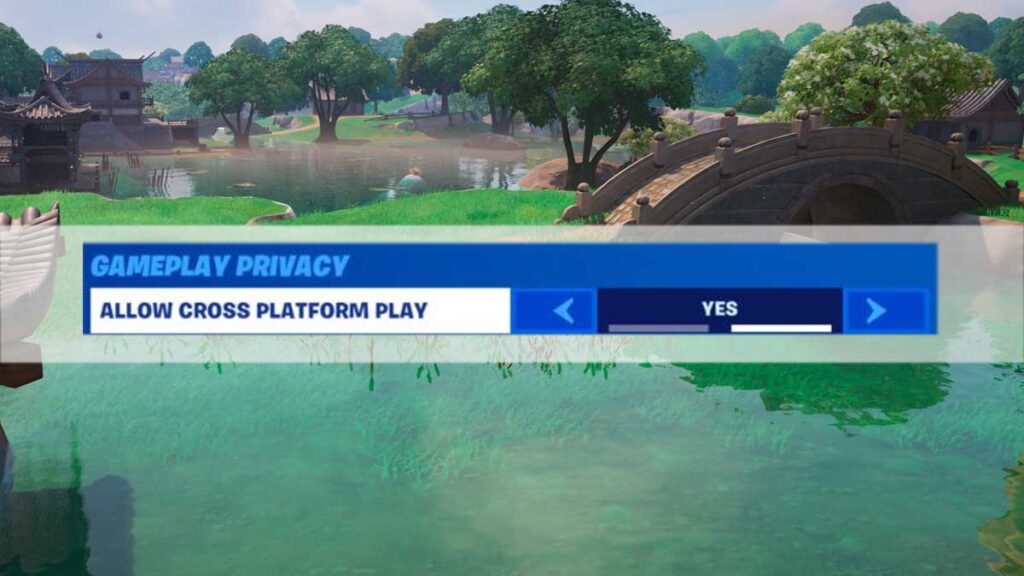
- Scroll down to Gameplay Privacy.
- Set Allow Cross Platform Play to Yes to turn crossplay on, or No to turn it off.
- Apply the change before leaving the menu.
How to turn off Fortnite crossplay on Xbox Series X|S and Xbox One
- Press the Xbox button and go to Profile & System, then Settings.
- Select Account, then Privacy & Online Safety, then Xbox privacy.
- Choose View Details & Customize, then Communication & Multiplayer.
- Set “You can join cross-network play” to Allow to turn crossplay on, or Block to turn it off.
- Restart Fortnite so the change takes effect.
This cross-network play setting belongs to your Xbox profile rather than Fortnite, so blocking it turns off crossplay in every game you play on Xbox. On a child’s account, parents control the same option through Xbox family settings, so check it first if a younger player can’t join friends on other platforms.
How to turn off Fortnite crossplay on Nintendo Switch and PC
Epic Games says Fortnite crossplay can’t be turned off on Nintendo Switch, PC or mobile, and the Switch 2 version doesn’t offer a toggle either. Players on those devices always share matchmaking with other platforms, which keeps their queue times short.
What happens when you turn crossplay off in Fortnite?
Crossplay significantly lowers queue times and warns that some modes may only work in Solo when crossplay is off. You’ll also only match with players on your own platform, which rules out playing with friends on other devices until you switch crossplay back on.
Leaving Fortnite crossplay on is the better choice for almost everyone. Lobbies limited to your own console sound appealing, but longer queues and modes that may only run in Solo make it a poor trade unless you specifically want to avoid PC and mobile players for a session.
Does Fortnite have cross-progression? What carries over between platforms
Any content you buy and any progress you make in Fortnite is available on every platform linked to the same Epic Games account, with V-Bucks as the only exception. A skin bought on PS5, for example, is already waiting in your Locker the next time you sign in on Switch. Even console-exclusive skins, such as Neo Versa and Eon, can be used on different platforms.
| What you have | Shared across platforms? |
|---|---|
| Outfits, Emotes and other Locker items | Yes |
| Pass progress and account level | Yes |
| Earned V-Bucks | Yes |
| V-Bucks bought on PlayStation, Xbox, PC, mobile or cloud gaming | Shared between those platforms |
| V-Bucks bought on a Nintendo console | No |
| V-Bucks bought on PC in Korea | No |
| Save the World progress | Yes, where the mode exists |
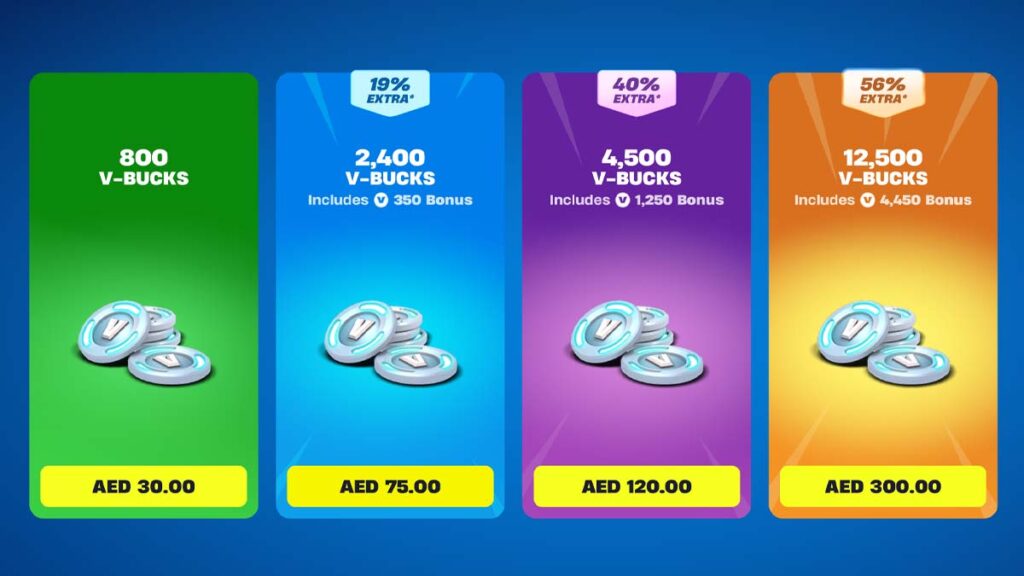
Epic’s Shared Wallet covers PlayStation, Xbox, PC, mobile and cloud gaming. However, Nintendo consoles sit outside it, so V-Bucks bought on a Switch stay on Nintendo hardware, and V-Bucks bought anywhere else never show up there. Earned V-Bucks are the exception and appear on every platform.
Epic’s own examples show how the balance changes, and you can check yours in your Epic Games account:
- 1,000 V-Bucks bought on PC: PlayStation, Xbox, PC and Android show 1,000, while Switch shows none.
- 1,000 V-Bucks bought on Switch: Switch shows 1,000, while PlayStation, Xbox, PC and Android show none.
- 1,000 V-Bucks bought on PlayStation plus 500 earned from the Battle Pass: PlayStation, Xbox, PC and Android show 1,500, while Switch shows 500.
The Nintendo split is the biggest trap in Fortnite’s cross-progression, so decide where you’ll spend V-Bucks before you buy them. A Switch balance cannot be used on any other platform, which is especially bad since the latest V-Bucks price change made every bundle smaller.
Does Fortnite voice chat work across platforms?
Fortnite’s built-in voice chat works between every platform, so a PS5 player can talk to friends on Switch, PC, and mobile in the same party. However, console party chat can get in the way, as being in a PlayStation or Xbox party stops Fortnite’s own voice chat from working.
Fortnite splits voice chat into two channels, and you can switch between them from the Social menu:
- Party Channel: Connects everyone in your Epic party, including friends who joined from the Epic Games Launcher or the Epic Games mobile app rather than Fortnite itself.
- Game Channel: Connects teammates on your team who aren’t in your party, such as players who filled your squad.
If cross-platform voice chat stays silent, leave any PlayStation or Xbox party, make sure voice chat isn’t set to Nobody, and turn off Mute Game Voice Chat. On Xbox, the privacy setting that lets you communicate outside Xbox with voice and text also needs to allow it.
Younger players have extra limits. Cabined Accounts, which Epic uses for players under 13 or under their country’s age of digital consent, can’t use voice or free text chat until a parent gives consent.
Thanks to crossplay, you can bring your friend and level up quickly using one of the best XP maps in Fortnite.
Frequently Asked Questions
Every current version of Fortnite plays with every other one, from PS4 and Xbox One to Switch 2, iPhone, and Android, and cloud gaming players join the same matches.
PS4 and Xbox One players share parties and matches with each other and with every newer platform, including PS5, Xbox Series X|S, and Switch 2.
No, Fortnite is free to play online on PlayStation, Xbox and Nintendo consoles without a paid subscription, and crossplay doesn’t change that.
You can turn off Fortnite crossplay on PlayStation and Xbox consoles. Unfortunately, you cannot disable crossplay on PC and Nintendo.